

This is the first blog that explores various ways to use artifacts in Azure DevOps pipelines. Artifacts are files saved on a pipeline that can be downloaded, or shared between jobs in a pipeline. This blog will cover publishing artifacts and the next one covers downloading them. Stick with me to find the hidden danger of using artifacts. (Spoiler: don’t use containerfolder!)
Some examples of artifacts I’ve created:
- Build logs
- Test results
- Code coverage reports
- Kubernetes manifests
- Vulnerability reports
- Generated Dockerfiles
- Bicep output
- Files for use by other stages. I had a pipeline that migrated data from one environment to several others. The first stage exported the data from the “source” environment, and then
nnumber of other stages used that file to import the data into other environments.
I assume you have a basic understanding of Azure DevOps pipelines and the terminology. In an earlier blog there’s a brief lesson on pipelines.
Uploading Artifacts
There are three ways to upload artifacts to an Azure DevOps pipeline:
- Use the PublishPipelineArtifact task.
- Use the publish keyword in the YAML pipeline, which is a shorthand for the
PublishPipelineArtifacttask. - Write to the console the ##vso[artifact.upload] command in a script.
Which way you use is a matter of preference or context. Sometimes you’re running a script, and adding an echo ##vso[artifact.upload] is easier than adding a task. If you’re not in a script, then using the task is easier.
There are other ways to associate files with a pipeline, which are not covered in this blog.
Using ##vso[artifact.upload]
Write this to stdout and it will upload the file or folder to the pipeline’s artifacts. The syntax is:
echo "##vso[artifact.upload containerfolder=<containerfolder>;artifactname=<artifactname>]<file or folder>"
containerfolderis optional and not shown in the portal. It is best not to supply it. See below.artifactnameis the name of the artifact you see in the portal.fileorfolder’s files to upload from the build box. They will show up underartfactnamein the portal.
For example:
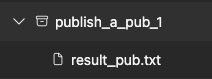
echo "##vso[artifact.upload artifactname=publish_a_pub_1]$(Agent.TempDirectory)/result_pub.txt"
The artifacts tab of the pipeline now looks like this:
Using a Task
The PublishPipelineArtifact task is similar to the ##vso[artifact.upload] command. The basic syntax is below. If artifact is not supplied, a unique id is used.
- task: PublishPipelineArtifact@1
  inputs:
    targetPath: '$(Agent.TempDirectory)/result_pub.txt'
    artifact: 'publish_a_pub_1'
The publish keyword is a shorthand for the PublishPipelineArtifact task. This is equivalent to the above task.
- publish: '$(Agent.TempDirectory)/result_pub.txt'
  artifact: 'publish_a_pub_1'
Both of those create the same artifact as shown in the vso example above.
Do Not Use containerfolder!
This is where I had problems. The documentation for containerfolder is sparse: folder that the file will upload to, folder will be created if needed. I was never sure what to use for the value, but I set it anyway and got myself into trouble.
After much experimentation, what I found is that if you use containerfolder, all files to written to all artifacts that use that containerfolder!
Here’s a test pipeline with two stages, a and b, that write two files to an artifact with the env name.
stages:
  - $:
      - stage: $
        displayName: $
        jobs:
          - job: $
            displayName: 'Using ##vso[artifact.upload]'
            pool:
              vmImage: 'ubuntu-latest'
            steps:
              - checkout: none
              - pwsh: |
                  "this is from $ at $((get-date).tostring("mm:ss.fff"))" > $(Agent.TempDirectory)/result.txt
                  "this is from $ at $((get-date).tostring("mm:ss.fff"))" > $(Agent.TempDirectory)/$_result.txt
                displayName: 'Write files'

              - pwsh: |
                  Write-Host "##vso[artifact.upload containerfolder=common_folder;artifactname=$]$(Agent.TempDirectory)/$_result.txt"
                  Write-Host "##vso[artifact.upload containerfolder=common_folder;artifactname=$]$(Agent.TempDirectory)/result.txt"
                displayName: 'Create artifact for $'
What I expected to see in the artifacts tab was something like this:
> a
  a_result.txt
  result.txt
> b
  b_result.txt
  result.txt
But what I got was this:
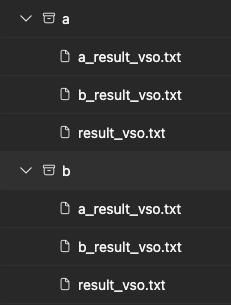
The b file shows up in a’s artifact and vice versa?! The worst part is that a’s result.txt is the one created by the b job! I lost the result.txt file created by the a job. The b job overwrote it – in the a artifact! If you add more stages, result.txt in every artifact will be the last one created.
If you’re quick and look at a’s artifacts before b runs you see the expected artifacts:
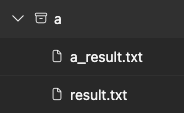
To fix the problem, remove containerfolder.
              - pwsh: |
                  Write-Host "##vso[artifact.upload artifactname=no_containerfolder_$]$(Agent.TempDirectory)/$_result.txt"
                  Write-Host "##vso[artifact.upload artifactname=no_containerfolder_$]$(Agent.TempDirectory)/result.txt"
                displayName: 'Create artifact for $ without containerfolder'
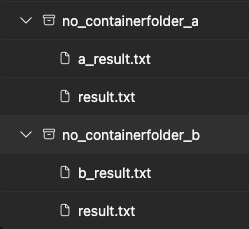
This results in the expected output. Now results.txt in the no_containerfolder_a artifact is the one created by the a job and no_containerfolder_b is the one created by the b job.
Using the PublishPipelineArtifact task or the publish keyword does not have this problem.
Hope that helps!
Here’s a little bonus topic.
Using the Command Line to List Artifacts
The excellent VSTeam module has a command to get the artifacts from a pipeline.
$artifacts = Get-VSTeamBuildArtifact -Id $pipelineBuildId -ProjectName $projectName
It’s interesting to see that using vso the type is Container, and when using the task it’s PipelineArtifact. That’s probably the cause of the problem with containerfolder.
$artifacts # dump name, type, and downloadUrl by default

Name                       Type             Download Url
----                       ----             ------------
a_task                     PipelineArtifact https://artprodcus3...
a_vso                      Container        https://dev.azure.com/...

# dump the data, which is different for the two types of artifacts
$artifacts | Select-Object name, type, @{n='data';e={$_.resource?.data}}

name                       type             data
----                       ----             ----
a_task                     PipelineArtifact 30DB7A029D66776FC68...
a_vso                      Container        #/20315734/common_folder
For artifacts created with the ##vso[artifact.upload] the data property a path with the containerId and containerFolder and for the task, it’s an opaque id.